AWS Explorer
Using AWS Explorer in Visual Studio Code
AWS Explorer provides you with a view of some AWS services you can work with when using AWS Toolkit for Visual Studio Code.
This section provides information on accessing and using AWS Explorer in VS Code. It assumes you have installed and configured the Toolkit for VS Code on your system.
Some key points:
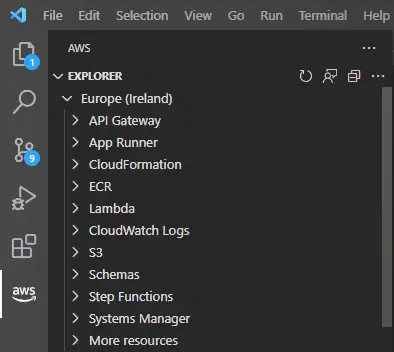
- If the toolkit is installed and configured correctly, you’ll see items in AWS Explorer. To view AWS Explorer, select the AWS icon in the Activity Bar.
Example:
This helps identify the necessary AWS network permissions. For example, to view AWS Lambda functions in your AWS account, the authentication information you’ve configured in Authentication and access must include at least Lambda read permissions. Refer to the following topics for more information on the network permissions each function requires.
- If you want to interact with AWS services not immediately shown in AWS Explorer, you can go to Other resources and choose from hundreds of resources that can be added to the interface.
For example, you can select AWS Toolkit: CodeArtifact:: Repository from the list of available resource types. Once this resource type is added to Other resources, you can expand the entry to view a list of resources creating different CodeArtifact repositories with their own attributes and features. Furthermore, you can describe the attributes and features of the resources in JSON-formatted templates, which can be saved to create new resources in the AWS cloud.